

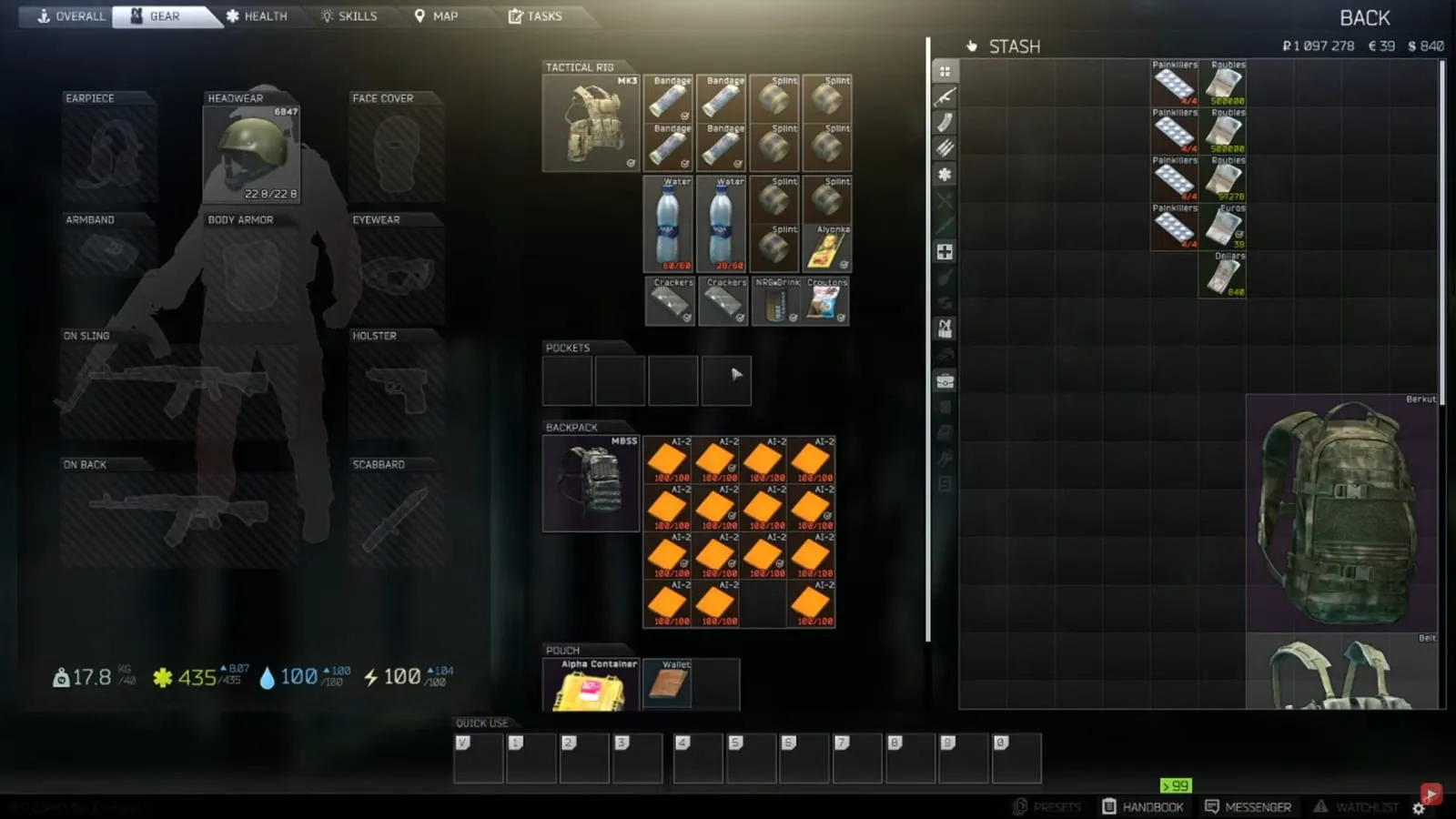
Escape from Tarkov is a popular fast-paced multiplayer first person shooter where survival and the right equipment are key. With nearly 2,000 items you can potentially collect, you may find yourself struggling to keep things organized and easily accessible. Here are some tips to help you keep your inventory tidy.
Where Can You Find Good Loot?
If you are new to Escape from Tarkov, playing offline is one of the best ways to figure out where good loot is. Playing in offline mode will allow you to explore the maps, figure out the best areas for loot, and learn where the extraction points are.

Image Source
In offline mode, there are Scavs, which are NPCs. You can set how many spawn on the map and their difficulty level. If a Scav kills you, you don’t lose any of your loot, so it doesn’t matter if you die. This is great for you to practice with weapons and gear so you can figure out what works best for your playing style before taking on other players online.
To access offline mode, select the map you want, click next twice, and then choose the option to play offline.
Once you have gotten practice, there is a map called Reserve that is one of the most profitable maps in the game, but it is also quite challenging. It can be worth it if you can make it out alive. Another popular map for looting is Interchange.
How Do You Organize and Manage Your Inventory?
After exploring the maps and getting into some intense battles, you probably have collected quite a bit of loot. If you have a tendency to hoard resources, you may find your inventory becoming an anxiety-inducing, jumbled mess.
To help take care of that problem, you can auto-sort your inventory by clicking the little button on the bottom left of the inventory screen.
A good rule to follow is to only keep the rarest items, and items you need for quests. If you have a lot of items you don’t use, like items for guns you don’t like, just go ahead and sell them at the flea market. That will free up space and give you more money to put toward items that will be useful for you.

Image Source
You can also store backpacks inside of other backpacks from largest to smallest, but only inside of your stash and not on your character.
How Do You Increase Inventory Space?
You can expand your stash’s inventory space by upgrading it in your hideout base. Keep an eye out for the items required for an upgrade.
Your inventory is made up of gray squares where your items will fit. It takes practice to figure out how to Tetris your items into the squares in order to maximize how much loot you can carry with you. Here are some tips to utilize your inventory space.
1. Rotate Items
Hit R while holding an item to rotate it. Also check your weapons, as some of them have an option to fold them so you can free up more space. For some guns with larger magazines, the magazines can be removed so they fit in smaller sections.

Image Source
2. Quick Equip and Move Items Between Your Character and Inventory
Here are a couple shortcuts that will allow you to quick equip items and move items between your character and your stash:
- Alt+click to quick equip items
- Ctrl+click to quickly move items
3. Check Which Magazines and Ammo Go With Your Weapon
To help narrow down which magazine works with your weapon, remove the magazine from the weapon you want to use and then click and drag the magazine you want to test toward the weapon. If they are compatible, they will turn green. If not, the weapon will turn red.

Image Source
If you want to know what types of ammo the magazine takes, you can unload the ammo, which will pop it out and allow you to look out for more of the same type.
Loading back in the right ammo is as easy as right clicking and going to load ammo.
4. Organize Your Ammo
If you are starting to run out of stash space due to various types of ammo, look for an ammo case, which will allow you to store lots of ammo in it while only taking up 4 squares of inventory.
End Note
Now that you have your inventory cleaned up and you are getting experience exploring maps, you should be ready to take on more competitive online play. Using gaming VPNs such as Express VPN can be useful to reduce lag to keep the playing field even, and to maintain your privacy from your competitors.
Escape from Tarkov is a great game. These tips above should help you navigate your items quicker and easier to help support even more successful raids. Have fun!
Related stories

Bacary Sagna on FIFA, Arsenal, Man City & Declan Rice
TGC caught up with former Arsenal, Man City and France full-back Bacary Sagna to talk about the title race, FIFA, and more.

David James on Star Wars, Liverpool's Current Form, And More
We sat down with the former England, Liverpool, and Manchester City goalkeeper on the state of football affairs at his former clubs,.

Louis Saha Roasts Wayne Rooney's FIFA Skill: "I Remember Him Throwing Controllers"
We spoke with the former Manchester United and France player on Wayne Rooney and Patrice Evra, the state of United, and more.